How to Download the Coinbase Mobile App and Set It Up Safely on Your Phone
Coinbase Mobile App Download: What Actually Matters
You grab the Coinbase mobile app and think you're done. You're not. A download is just the door opener - you still need to pick a wallet, lock down security, and learn to spot the scams that come with the territory.
This article walks through the real choices after your coinbase mobile app download . No hype, no marketing copy - just what you need to know.

Coinbase App, Coinbase Wallet, and Base App
Coinbase is a U.S.-based crypto platform for buying, selling, and storing digital assets. The self-custody product called Coinbase Wallet got rebranded to Base App in 2025. Same product, new name.
Base App is a free, non-custodial hot wallet. You hold your private keys, not Coinbase. It stays online, which means convenience but also exposure. Existing Coinbase Wallet users get the update automatically. New users can grab Base App on mobile or desktop.
The wallet links to your Coinbase exchange account for easy transfers, but it works standalone too - no exchange login required. You can buy crypto with fiat via bank transfer, debit, or credit card.
A self-custodial wallet puts the keys in your hands. That means freedom and full responsibility at the same time.
What Base App Can Do
Coinbase Wallet started as Toshi in 2017, became Coinbase Wallet in 2018. It began as Ethereum-only and grew into a multichain wallet supporting Bitcoin, Ethereum, Solana, Dogecoin, and more.
Base App keeps the old Coinbase Wallet features and adds deeper Base network integration. It supports decentralized apps, token trading, NFT management, and transaction review. These cryptocurrency apps keep expanding what a mobile wallet can handle.
Base App features
- Direct connections to decentralized apps and Web3 services
- EVM and selected non-EVM network support
- Link to a Coinbase exchange account
- 12-word recovery phrase
- Passkey support and cloud backup
- Hardware wallet connections like Ledger
- USDC interest rewards
- Fiat purchases through payment methods
Base App does not cover every chain. Coinbase dropped Bitcoin Cash, Ethereum Classic, and XRP integrations back in 2023.
MetaMask: The Ethereum-First Option
MetaMask is a self-custodial hot wallet by Consensys. It launched in 2016 as a browser extension for Chrome and Firefox, built for Ethereum and Ethereum-based dApps.
Now it has Android and iOS apps alongside browser access. Known for the fox mascot, it claims millions of users and a long Web3 history. The Trezor application is another hardware wallet option that pairs well with MetaMask for users who want both software and hardware layers.
MetaMask supports
- Ethereum and EVM-compatible networks
- Binance Smart Chain, Avalanche, Polygon
- Other networks through Snaps plugins
- Connections to dApps, DeFi, and NFT services
- Ledger and Trezor hardware wallets
- Mobile biometric login
- Advanced transaction settings with max gas controls
- MetaMask Mastercard debit card in some regions
MetaMask lets you buy crypto through third parties like PayPal and Revolut.
MetaMask is not a lower-tier wallet. Its strength is Ethereum focus, customization, and integrations.
Base App vs MetaMask: Where They Differ
Blockchain support
- Base App covers Bitcoin, Ethereum, Solana, Dogecoin, EVM and non-EVM chains
- MetaMask stays centered on Ethereum and EVM, with Snaps expanding reach
Interface and control
- Base App aims beginner-friendly and intuitive on mobile and desktop
- MetaMask prioritizes functionality and customization - more control, steeper learning curve
Hardware wallet support
- Base App connects to Ledger
- MetaMask connects to Ledger and Trezor
Recovery and auth
- Base App: 12-word phrase, passkeys, cloud backup
- MetaMask: 12-word phrase, wallet password, optional biometric login
Extra features
- Base App: Coinbase exchange link, USDC rewards
- MetaMask: granular transaction controls, Mastercard debit card
When you compare crypto wallets software options, the multichain reach of Base App stands out against MetaMask's Ethereum depth. Neither is objectively better - they serve different workflows.
Which Hot Wallet Fits You
Pick Base App if you want beginner-friendly setup, broad multichain support, Bitcoin and Solana alongside EVM assets, direct Coinbase exchange transfers, and a simpler interface with USDC rewards.
Pick MetaMask if you live on Ethereum, want detailed transaction controls, custom settings for dev work, open-source software, and advanced Web3 workflows. Among crypto wallets best for Ethereum power users, MetaMask remains a top pick for a reason.
Self-Custody Means You Own the Risk
Moving crypto from an exchange to a self-custodial wallet removes the middleman but puts all security responsibility on you. A self-custodial wallet holds the keys to access your assets - no exchange holds them for you.
You must protect private keys, recovery phrases, device access, app settings, and connections to hardware wallets and dApps. Lose the password or recovery phrase and you lose access. Plain and simple. An e wallet for cryptocurrency is only as safe as the habits you build around it.
Self-custody is credential management under your control. That is the Bitwarden source definition, and it is the only honest way to describe it.
Transfers Between Wallets and Coinbase
To move crypto from MetaMask to Coinbase, copy the public receiving address from Coinbase, open the ETH wallet in MetaMask, paste the address, and confirm. ETH arrives in minutes depending on gas and network congestion.
Existing Coinbase Wallet users update to Base App automatically - no export or recreation needed. Ledger connects to Coinbase Wallet or Base App through the mobile app or Chrome extension.
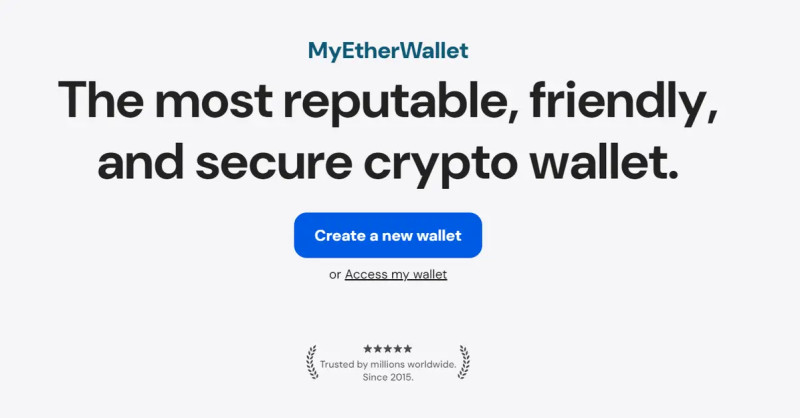
MyEtherWallet Mobile can import BTC from Coinbase Wallet. MyEtherWallet calls itself the first open-source Ethereum wallet, trusted by millions. Note: access restrictions can flag wallets from sanctioned jurisdictions.
Two-Factor Authentication: Do It Right
Two-factor security means something you know (password) and something you have (device). SMS was supposed to prove device possession, but phone numbers can be ported or stolen. Telecom companies are the weak link.
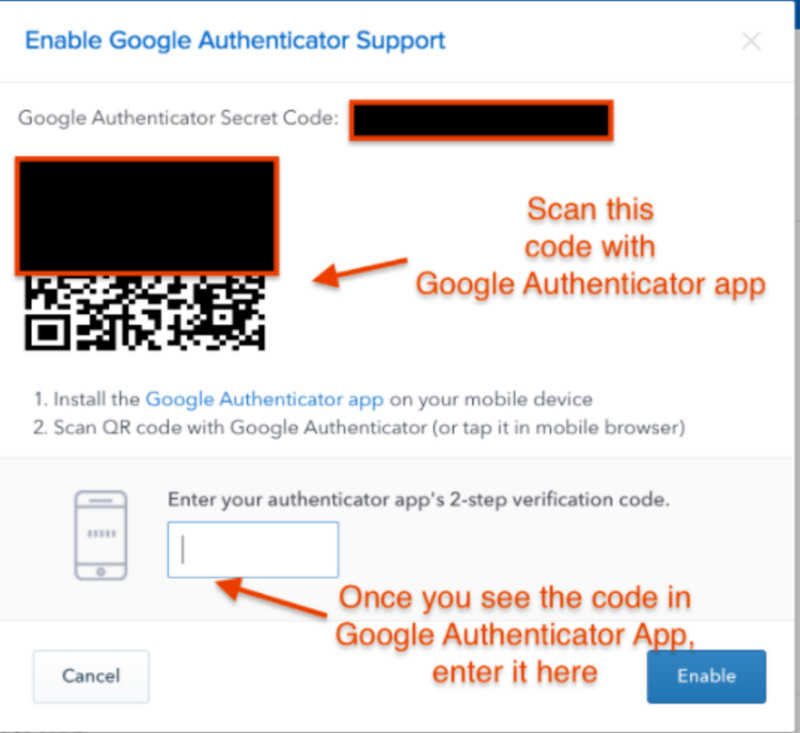
Use an authenticator app instead, especially with large balances. The Coinbase guidance from 2017 recommended Google Authenticator or Microsoft Authenticator. Setup: download the app, open Coinbase security settings, scan the QR code, store the secret key, enter the six-digit code at login.
The QR code shares a secret key with Coinbase. Time-based One-Time Password protocol combines that secret with current time for a six-digit code. Unlike SMS, the code never travels over the air - harder to intercept.
The 2017 guidance also supported Authy. Disable Authy's multi-device option. Watch for Authy emails about 2FA changes.
Security Notifications and Account Locking
Coinbase emails can report 2FA changes, password changes, device authorizations, and withdrawals. Treat these as important. A one-time link at the bottom can trigger a Disable Signin page that locks your account.
Hover over any link before clicking and confirm it goes to Coinbase.com. The account-locking page exists for when you suspect unauthorized access.
Password Management for Crypto Accounts
A strong password plus 2FA is the baseline. A password manager can store exchange credentials, wallet credentials, 2FA info, and recovery material - if the manager itself is secured.
Bitwarden uses end-to-end and zero-knowledge encryption. The provider cannot see your vault contents, cannot reset your master password, and stores only encrypted data.
Bitwarden safeguards
- Open-source software
- Third-party security audits
- Local encryption before cloud upload
- Encrypted storage, not readable passwords
- Optional self-hosting
- Used by millions
Bitwarden's generator creates random passwords and passphrases across mobile, browser, desktop, web vault, CLI, and web-based tools. Vault health reports flag exposed, reused, and weak passwords plus sites without secure connections.
Hot Wallets and Hardware Wallets
Software wallets - hot wallets - live on your phone or computer and stay online. They are simpler for less experienced crypto owners. Hardware wallets - cold wallets - are small USB-like devices for people holding large amounts across multiple chains.
A hardware wallet holds private keys, not coins directly. Keys stay offline during storage, which reduces hacking exposure. But hardware wallets need careful handling and are more complex to use.
Buying and Connecting a Hardware Wallet
Coinbase consumer guidance from November 2024 says buy from a trusted manufacturer or authorized dealer. Ledger is a compatible brand.
Purchasing precautions
- Buy direct from manufacturer or authorized dealer
- Check the seller's website quality and URL
Unverified marketplaces can sell counterfeit devices or impersonated products. Use private Wi-Fi for wallet setup. On public Wi-Fi, use a VPN.
Write down your recovery phrase and store it somewhere only you know. Never keep the only copy online or on a compromised device. Before connecting hardware, find an official tutorial for that model.
Never link a wallet to unverified software. Never use a hardware wallet you did not buy yourself. Even secure devices get hacked - counterfeit cold wallets mailed to targets from third-party data breaches can steal assets on connection.
Coinbase Mobile DEX Trading
Coinbase rolled out decentralized exchange trading in its mobile app for U.S. users, excluding New York. The feature first reached selected users in August and expanded later.
It lets users trade tokens before formal listing on Coinbase, with access to millions of assets near launch. The rollout uses Coinbase's Base network for discovery and execution. Initial assets included Virtuals AI Agents, Reserve Protocol DTFs, SoSo Value Indices, Auki Labs, and Super Champs.
Coinbase integrated the 1inch Swap API for direct non-custodial swaps. The self-custodial wallet inside the Coinbase app gives direct on-chain access without holding trades in a Coinbase exchange account.
"This integration with 1inch is a significant step forward in bringing onchain trading to our users." - Scott Shapiro, head of trading at Coinbase
Reported trading volume figures show $237 billion in Q2 2025 and $1.226 trillion in perpetual DEX volume over 30 days. The direction of growth points toward decentralized platforms offering transparency, self-custody, and continuous global access.
Tracking Wallet Activity and Taxes
CoinTracker syncs balances, transactions, and tax data from Base App, Coinbase Wallet, MetaMask, and other wallets or exchanges. It supports 500+ integrations, calculates cost basis, exports to IRS Schedule D, and works with TurboTax and H&R Block.
The wallet comparison notes this tracking is informational, not tax advice. If you are serious about your crypto taxes, hooking up a tracker like CoinTracker saves hours of manual work.
Comments on “How to Download the Coinbase Mobile App and Set It Up Safely on Your Phone”
No comments yet. Be the first to share your thoughts.