A Beginner's Guide to Comparing the Best Crypto Wallets Safely
Best Crypto Wallets Compared for Security and Ease
When people search for “crypto wallets best,” they usually mean a wallet that is safe and easy. There is no one best cryptocurrency wallet for everyone. The right pick depends on the coins you hold, the apps you use, and who controls the keys. I would compare custody, key storage, network support, fees, recovery, and the damage one mistake could cause.
The labels can be messy. A digital crypto wallet may be an app, browser extension, desktop program, or physical device. The odd phrase “e wallet for cryptocurrency” still points to a digital wallet, not a purse full of coins.
How a Crypto Wallet Controls Your Coins
A crypto wallet does not normally hold Bitcoin, Ethereum, or cash. Those assets remain as entries on a blockchain. The wallet holds or derives the keys used to control those entries, so losing the device is not the same as losing the blockchain record.
The parts that control a wallet
- Public address: Shows where assets should be sent and identifies the destination.
- Private key: Signs a transaction and proves control over the assets.
- Signature: Confirms that the holder of the private key approved the transfer.
- Seed phrase: A common backup that can be used to restore self-custodial wallet keys.
A wallet address acts much like a bank account number, except it normally has its own chain of letters and numbers. Blockchain balances and transactions are often public, which can expose more history than a person expects. If the keys are lost, the entries may remain on the blockchain while the owner can no longer reach them.
If you don’t have your keys, you don’t have your bitcoin.
Custodial and Self-Custody Wallets
A custodial wallet keeps control with a company or platform. The setup is often easier, recovery may be easier, and the provider can handle many technical parts. The trade-off is trust: the provider controls the private keys and can decide whether, when, and how you can withdraw assets.
Main custodial wallet trade-offs
- The provider may freeze or restrict an account.
- An exchange problem can affect every asset held there.
- The user may have no direct blockchain withdrawal access.
- Exchange accounts often cannot connect straight to Web3 apps.
A self-custody wallet gives you control of the keys, but it also gives you the job of protecting the account, devices, backups, and recovery details. Zengo, CoinRabbit, and P100 use MPC or hybrid designs that avoid a normal seed phrase in some setups. That can remove one common backup problem, but account access, recovery, devices, and the service behind MPC still need protection.
Not your keys, not your crypto.
Hot, Cold, and Warm Wallets
The hot-versus-cold split comes down to where signing credentials live. A hot wallet keeps keys or signing data on an internet-connected device, which makes transfers fast but raises the chance of malware, phishing, or device theft. A cold wallet keeps keys away from the internet until they are needed.
Main wallet storage types
- Hot: Online, browser, mobile, and desktop wallets for frequent use.
- Cold: Hardware or paper wallets used for long-term storage.
- Warm: A partly online setup that adds a user approval step.
- Paper: A printed public address and private key with no network connection.
Warm wallet is not a standard product type. In the source material, it describes infrastructure where keys may stay online but a person must approve transfers. Fortanix offers a managed version for businesses, with a second time-based password factor placed in a protected computing setting. That is business infrastructure, not a normal retail wallet comparison.
Software, Browser, and Mobile Wallets
A software wallet runs on a computer, phone, or browser. It may give you direct control of the keys, but a stolen computer, bad browser extension, malware, or fake download can put that control at risk. A mobile wallet adds portability, while a browser wallet fits many DeFi sites and NFT markets.
Common software wallet forms
- Desktop: Electrum, Exodus, and Jaxx are named as examples.
- Browser: MetaMask, Rabby, Frame, Rainbow, and MyEtherWallet support Web3 use.
- Mobile: Trust Wallet, Coinbase, Kraken, MetaMask, and Busha are named in the sources.
- Web-based custodial: The host controls the keys and manages account access.
When you compare crypto wallet software , ask where the keys live and what happens after a failed update. The Exodus Wallet is one desktop example in the source, but a local key file still needs a tested backup. A copy kept on the same computer is not a real backup because one failure can take both copies.
Choosing by Experience and Value
The best wallet depends on your Web3 experience, the amount at risk, how often you trade, and what you need the wallet to do. “Large” and “small” are personal words. An amount that would hurt one person may be minor to another, so there is no fixed dollar line that fits everybody.
A wallet path by experience
- Total beginner: Start with a custodial wallet or exchange such as Coinbase or Kraken.
- Small balance: A browser wallet can suit everyday Web3 use and modest amounts.
- Medium balance: Move toward a hardware wallet.
- Large balance: Pair a hardware wallet with multisig or social recovery.
- Advanced control: Consider a tested multisig, self-built setup, or other managed design.
A wallet for each crypto coin may also mean a wallet on a different network. Bitcoin, Ethereum, stablecoins, and many smaller tokens can use separate systems. Check the exact coin and network first, because sending on the wrong chain can lock the funds or send them somewhere you did not intend.
Browser, Mobile, and All-in-One Wallet Profiles
If your question is what is the most popular crypto wallet , the source material does not prove one universal winner. The most common crypto wallets in these examples belong to different groups. Some focus on exchanges, some on mobile use, and some on Web3 apps.
Wallet profiles named in the sources
- Coinbase and Kraken: Custodial choices with familiar buying, selling, and account tools.
- MetaMask, Rabby, Frame, Rainbow, and MyEtherWallet: Self-custodial browser wallets built around Ethereum and Web3 apps.
- Trust Wallet: A mobile-first, noncustodial option with broad token support and a built-in decentralized exchange.
- Zengo: A mobile wallet that uses MPC and does not ask for a normal seed phrase.
- CoinRabbit: A hybrid wallet for storage, swaps, and loans with no seed phrase.
- P100: An all-in-one app with a Euro account, debit card, transfers, crypto services, and an MPC wallet.
- Busha: An exchange-connected online and mobile wallet with desktop access.
More features can save trips between apps, but they also add fees, permissions, and more places where something can fail. The source review positions CoinRabbit for simpler use rather than active trading or DeFi. It flags chain breadth and swap fees for Zengo, and it gives mixed customer-support claims for Trust Wallet. Check the exact support channels, supported chains, and fees before depositing.
Hardware Wallets for Long-Term Holdings
A hardware wallet keeps private keys on a physical device and signs transactions after checking details on its screen or companion app. Many keys can remain offline while the device is not in use. That creates a physical wall between the keys and an internet-connected computer, though it does not remove every risk.
Hardware wallet features to check
- Offline or air-gapped key storage
- PIN and optional passphrase protection
- Physical confirmation of transactions
- Desktop wallet and app compatibility
- NFC, USB, or Bluetooth support
- Secure-element chip protection
- Support for the exact assets and networks you need
The device can still be lost, stolen, damaged, coerced into use, or replaced with a fake unit. A hardware wallet may also depend on a companion app and a correct seed backup. Buy directly from the maker or a checked seller. A package from an event or unknown marketplace can be tampered with before it reaches you.
Hardware Wallet Models Compared
The source names several hardware wallets, but their fit depends on open-source preferences, supported chains, screen size, connection method, and companion software. The cited hardware examples also show why price alone cannot tell you which device is safest.
Hardware models named in the sources
- Trezor Model One: An entry-level cold wallet with offline keys, PIN, passphrase support, and Trezor Suite.
- Trezor Safe 5: Identified as open source and positioned as a stronger hardware option.
- Ledger Flex and Ledger Nano Flex: Devices with E Ink signing screens, NFC, secure-element chips, and Ledger Live support.
- Grid+ Lattice1: Named as another option for users who accept a closed-source product.
Check the exact coin, network, token contract, and signing standard. The source comparison flags chain limits for some devices, but support can change with firmware and software. A larger screen or higher price may help with verification, yet setup errors, weak recovery notes, or a bad download can still cause loss.
Multisig and Social Recovery for Large Holdings
A multisignature wallet needs several signers to approve a transaction. In the source’s 3-of-5 example, three of five wallets must sign before 5 ETH can move. The signers can sit on different hardware, browser, or desktop wallets, which removes reliance on one device and one key.
Social recovery solves a different problem. A normal signing key handles everyday transactions, while a group of guardians can replace it if the key is lost. The source describes a majority of at least three guardians and names Safe and Argent as possible options.
Ways to share control and recovery
- Multisig: Several keys must approve each transaction.
- Social recovery: Guardians can replace a lost signing key.
- Shamir backup: The secret is split into shares that need a set number to restore.
- Separate devices: Signers or shares can be kept in different locations.
Under all normal circumstances, the user can simply use their social recovery wallet like a regular wallet.
These setups add setup steps and may have weak support across chains and apps. A wrong address, lost signer, or broken recovery rule can stop access. Test recovery with small amounts and write down which devices, guardians, chains, and apps are part of the setup.
What Makes a Wallet Easy to Use?
Ease is more than a clean screen. A new user should be able to find a balance, receive a token, check the network, read the fee, and reject an unknown request without guessing. The source suggests that basic sending or receiving should take less than a minute after setup.
Daily-use checks
- Clear buttons and short setup steps
- Plain network and fee labels
- QR scanning for addresses
- Simple transaction confirmations
- A clean mobile or desktop layout
- Easy balance and history views
- Clear warnings for unknown tokens
- Recovery steps that are written down clearly
All-in-one wallets can combine storage, fiat accounts, cards, transfers, swaps, trading, and DeFi access. That saves app switching, but it also creates more integrations and fees. I would compare each extra service with what I actually need. A simple wallet for storage and a second wallet for Web3 use can be easier to reason about.
Security Features to Compare
Security claims need exact words. Encryption does not remove malware, and a secure chip does not fix a fake download. Compare what the product protects, where the keys live, who can recover them, and how updates are handled.
Wallet security features
- Two-factor and biometric authentication
- PIN, passphrase, or device locks
- MPC for splitting key material
- Multisig and social recovery
- Offline key storage
- Open-source code and security audits
- Phishing and transaction screening
- Supply-chain checks for updates and devices
Open-source code can let more people inspect it, but it is not a guarantee. Weak passwords, malicious extensions, bad updates, and wrong signing still matter. An EAL6+ chip describes a hardware component, not the whole wallet. The source guide also says its authors did not personally test the security of every wallet, so product names should start your own review rather than end it.
Assets, Fees, Devices, Privacy, and Support
Check asset support by exact name. A wallet may list BTC, ETH, USDT, or an altcoin while still lacking the network, token contract, or signing standard you need. Mobile wallets often list many assets, while hardware wallet support can differ more sharply by chain.
Details to compare before using funds
- Exact asset and network support
- Token contract and signing standard
- iOS, Android, desktop, or browser support
- USB, NFC, Bluetooth, or remote desktop access
- Network fee and gas price
- Swap spread and exchange fee
- Deposit, withdrawal, and lending charges
- Minimum limits, price impact, and third-party fees
A wallet can also expose addresses, balances, IP addresses, browser fingerprints, device data, and app connections. Public blockchain activity may reveal more than expected. Support quality matters too: one source gives Trust Wallet a strong community but no live support, while another wallet profile points to responsive chat. Check the support routes you can actually reach.
Price includes the device, account services, swaps, trades, network fees, and replacement hardware. A costly device may have a larger screen or broader support, but price alone does not prove safety.
Backups and Recovery Tests
A backup only helps if you can find it and use it. Seed phrases, Shamir shares, social guardians, multisig signers, encrypted files, and a second hardware wallet each handle recovery in a different way. MPC wallets may rely on account factors and provider tools instead of a printed seed.
Recovery cases to plan for
- Lost phone or computer
- Lost or damaged hardware wallet
- Forgotten password
- Lost seed phrase or recovery share
- Lost email or phone access
- Fire, theft, or property loss
- Death or inheritance
- Broken signer or guardian setup
A backup should not be considered useful until the user knows where it is and whether it can restore the intended wallet.
Paper or metal backups can work when stored in separate secure places. An encrypted password manager can help, but the source warns that the manager itself should not gain access to the key. Do not photograph, upload, text, or email a seed phrase, and do not give it to support staff you have not checked.
Where possible, test recovery with a small amount and the same device, network, and app flow you plan to use. Customer support usually cannot reverse a blockchain transfer or recreate a lost private key.
Why a Second Hardware Wallet Can Help
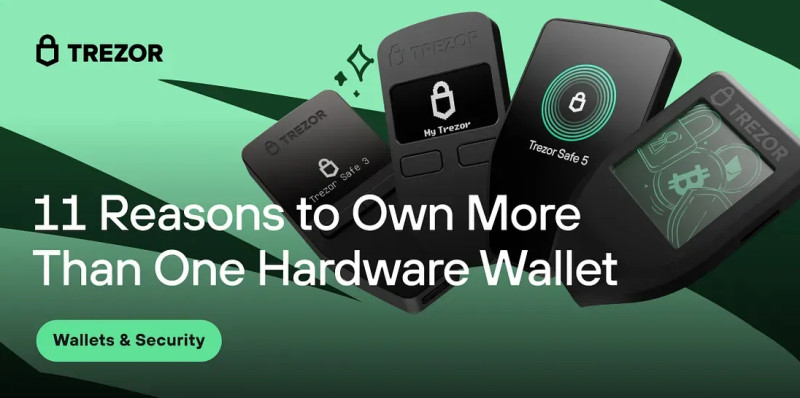
A second hardware wallet can act as a backup, but a second copy of the same setup does not fix a bad seed or bad setup. Restore it correctly, test it, and keep it in a separate physical place. One device may be enough, yet the second can cover failure and give you a cleaner division between daily use and long-term storage.
Reasons to use more than one device
- Emergency: Replace lost, stolen, or damaged hardware.
- Storage split: Keep long-term coins on a device used less often.
- Trading split: Use one connected device for small daily transactions.
- Bitcoin-only use: Separate Bitcoin signing from other assets.
- Travel: Carry a small wallet while the main device stays home.
- Inheritance: Leave clear device and recovery instructions.
- Business: Keep company funds apart from personal funds.
- Teaching: Use a spare device for demos and workshops.
One Trezor is enough to protect assets, but a second device can provide additional security, flexibility, and peace of mind.
More devices also mean more setup, storage, and signer checks. Multisig can spread control across locations, yet every device and guardian becomes part of the recovery plan. Start with one primary device and one tested backup before adding more moving parts.
Setting Up a New Wallet Safely
A search for how to get a crypto wallet should lead to the official app page or hardware vendor, not a search ad. The safer path to getting a cryptocurrency wallet safely starts with the custody choice, official download, account security, and a tested recovery plan.
Safe wallet setup
- Open the provider’s official website directly.
- Bookmark the support and download pages.
- Create a strong, unique account password.
- Turn on two-factor or biometric protection.
- Set device locks and transaction prompts.
- Write down recovery details offline.
- Test recovery on a small balance.
- Check the network and address before sending.
- Buy hardware from the maker or a verified seller.
Send a small test amount, such as $10, into and out of the wallet. This shows the real network fee, confirmation steps, and history view before a larger transfer. It can also expose a wrong address or network while the loss is still small.
One source suggests keeping no more than $100 in a hot wallet while learning, but that is an example, not a safe limit for everyone. Keep only what you can afford to expose on an internet-connected device. Splitting hot funds across wallets with different secret phrases can limit the damage from one compromised device.
Keys, Updates, and Phishing
A secure wallet can still be tricked into signing a bad transaction. The wallet may work as designed while a fake site asks for the wrong permission. Never approve a request because a message, token drop, or search result says you must “verify” your wallet.
Phishing and key warning signs
- A fake support page asks for a seed phrase
- An unsolicited token drop requests a signature
- A download comes from an unverified link
- The domain or wallet name has a small change
- The transaction asks for unclear token approval
- Clipboard malware changes the pasted address
- A random app asks to connect to your wallet
- Support urgently asks for a private key
If a private key or seed phrase is photographed, uploaded, texted, emailed, shown on screen, or seen by another person, treat it as stolen and move the funds to a fresh wallet. Do not trust a promise that the person who saw it will not use it.
Use supported wallet software, keep a separate restore path, and check the domain, app, network, contract, address, and fee before every large signature. One source flags Windows as a common malware target, but real risk depends on the device and its setup. Blockchain transfers are often final, so support cannot reverse a mistaken or stolen payment.
A Simple Choice by Wallet Type
The best crypto wallets for beginners, daily users, and long-term holders serve different jobs. Pick the custody model and device type first. Then check network support, recovery, and fees against the exact way you plan to use the wallet.
Choose the wallet that matches the job
- No key experience: Start with Coinbase, Kraken, or another custodial wallet, accepting provider risk.
- Small everyday Web3 balance: Use a well-reviewed browser wallet such as MetaMask, Rabby, or Frame.
- Mobile use with token variety: Compare Trust Wallet’s chain and app support with your exact asset list.
- No seed phrase preferred: Compare Zengo, CoinRabbit, and P100, including who controls recovery.
- Medium or long-term holdings: Use a hardware wallet bought from its official maker or a checked reseller.
- Large holdings: Pair hardware with a tested multisig or social-recovery plan.
- Frequent trading plus long-term storage: Keep daily funds hot and savings in a separate cold setup.
- Travel: Carry a limited hot wallet and leave the main hardware device at home.
- Business funds: Use a separate wallet and written signer, backup, and accounting rules.
Comments on “A Beginner's Guide to Comparing the Best Crypto Wallets Safely”
No comments yet. Be the first to share your thoughts.